 KnowForge
提供 http:h2 服务
 qianmoQ· 更新于 2026-10-05· 阅读 29 分钟· 0 次阅读
提供 http:h2 服务
学习如何提供 Http2 服务。
本文讨论的是普通的 htt/h2 服务,而非通过 http/h2 访问的 protobuf 服务。brpc 中的 http/h2 服务必须在 .proto 文件中声明请求和响应都为空的接口。这一要求使得所有服务声明都保留在 proto 文件中,而不会散落在代码、配置和 proto 文件各处。
示例
关于 h2
brpc 将 HTTP/2 协议命名为“h2”,无论是否加密。不过,不带 SSL 的 HTTP/2 连接在 /connections 页面上会以官方名称“h2c”显示,而带 SSL 的则显示为“h2”。
brpc 中 http 与 h2 的 API 基本相同。除非特别说明,文中提到的 http 特性同样适用于 h2。
URL 类型
以 /ServiceName/MethodName 为前缀
定义一个名为 ServiceName(不含包名)的服务,其中包含一个名为 MethodName 的方法,且请求/响应为空,则该服务默认会在 /ServiceName/MethodName 上提供 http/h2 服务。
请求和响应可以为空的原因在于所有数据都存放在 Controller 中:
- http/h2 请求的头部位于 Controller.http_request(),请求体位于 Controller.request_attachment()。
- http/h2 响应的头部位于 Controller.http_response(),响应体位于 Controller.response_attachment()。
实现步骤:
- 在 proto 文件中添加服务声明。
option cc_generic_services = true;

message HttpRequest { };
message HttpResponse { };

service HttpService {
      rpc Echo(HttpRequest) returns (HttpResponse);
};- 通过继承
.pb.h中生成的基类来实现服务,这与 protobuf 服务的实现方式相同。
class HttpServiceImpl : public HttpService {
public:
    ...
    virtual void Echo(google::protobuf::RpcController* cntl_base,
                      const HttpRequest* /*request*/,
                      HttpResponse* /*response*/,
                      google::protobuf::Closure* done) {
        brpc::ClosureGuard done_guard(done);
        brpc::Controller* cntl = static_cast<brpc::Controller*>(cntl_base);

        // body is plain text
        cntl->http_response().set_content_type("text/plain");

        // Use printed query string and body as the response.
        butil::IOBufBuilder os;
        os << "queries:";
        for (brpc::URI::QueryIterator it = cntl->http_request().uri().QueryBegin();
                it != cntl->http_request().uri().QueryEnd(); ++it) {
            os << ' ' << it->first << '=' << it->second;
        }
        os << "\nbody: " << cntl->request_attachment() << '\n';
        os.move_to(cntl->response_attachment());
    }
};- 将实现的实例添加到服务器后,可以通过以下 URL 访问该服务(注意
/HttpService/Echo之后的路径会被填入cntl->http_request().unresolved_path(),且总是会被规范化):
| URL | Protobuf 方法 | cntl->http_request().uri().path() | cntl->http_request().unresolved_path() |
|---|---|---|---|
| /HttpService/Echo | HttpService.Echo | “/HttpService/Echo” | "" |
| /HttpService/Echo/Foo | HttpService.Echo | “/HttpService/Echo/Foo” | “Foo” |
| /HttpService/Echo/Foo/Bar | HttpService.Echo | “/HttpService/Echo/Foo/Bar” | “Foo/Bar” |
| /HttpService//Echo///Foo// | HttpService.Echo | “/HttpService//Echo///Foo//” | “Foo” |
| /HttpService | 无此方法 |
以 /ServiceName 为前缀
用于管理资源的 http/h2 服务可能需要这种形式的 URL,例如 /FileService/foobar.txt 表示 ./foobar.txt,/FileService/app/data/boot.cfg 表示 ./app/data/boot.cfg。
实现步骤:
- 在 proto 文件中使用
FileService作为服务名,使用default_method作为方法名。
option cc_generic_services = true;

message HttpRequest { };
message HttpResponse { };

service FileService {
      rpc default_method(HttpRequest) returns (HttpResponse);
}- 实现服务。
class FileServiceImpl: public FileService {
public:
    ...
    virtual void default_method(google::protobuf::RpcController* cntl_base,
                                const HttpRequest* /*request*/,
                                HttpResponse* /*response*/,
                                google::protobuf::Closure* done) {
        brpc::ClosureGuard done_guard(done);
        brpc::Controller* cntl = static_cast<brpc::Controller*>(cntl_base);
        cntl->response_attachment().append("Getting file: ");
        cntl->response_attachment().append(cntl->http_request().unresolved_path());
    }
};- 将实现的实例添加到服务器之后,可通过以下 URL 访问该服务(
/FileService之后的路径在cntl->http_request().unresolved_path()中填写,它总是被规范化):
| URL | Protobuf 方法 | cntl->http_request().uri().path() | cntl->http_request().unresolved_path() |
|---|---|---|---|
| /FileService | FileService.default_method | “/FileService” | "" |
| /FileService/123.txt | FileService.default_method | “/FileService/123.txt” | “123.txt” |
| /FileService/mydir/123.txt | FileService.default_method | “/FileService/mydir/123.txt” | “mydir/123.txt” |
| /FileService//mydir///123.txt// | FileService.default_method | “/FileService//mydir///123.txt//” | “mydir/123.txt” |
Restful URL
brpc 支持为服务中的每个方法指定 URL。API 如下:
// If `restful_mappings' is non-empty, the method in service can
// be accessed by the specified URL rather than /ServiceName/MethodName.
// Mapping rules: "PATH1 => NAME1, PATH2 => NAME2 ..."
// where `PATH' is a valid path and `NAME' is the method name.
int AddService(google::protobuf::Service* service,
               ServiceOwnership ownership,
               butil::StringPiece restful_mappings);
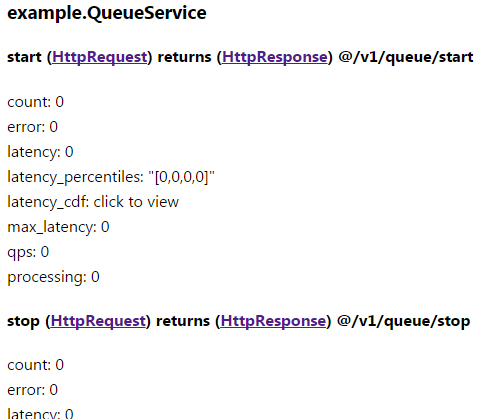
QueueService 定义在下方,其中包含多个方法。若将该服务正常添加到服务器中,则可通过形如 /QueueService/start 和 /QueueService/stop 的 URL 访问它。
service QueueService {
    rpc start(HttpRequest) returns (HttpResponse);
    rpc stop(HttpRequest) returns (HttpResponse);
    rpc get_stats(HttpRequest) returns (HttpResponse);
    rpc download_data(HttpRequest) returns (HttpResponse);
};
通过向 AddService 指定第 3 个参数 restful_mappings,即可自定义 URL:
if (server.AddService(&queue_svc,
                      brpc::SERVER_DOESNT_OWN_SERVICE,
                      "/v1/queue/start   => start,"
                      "/v1/queue/stop    => stop,"
                      "/v1/queue/stats/* => get_stats") != 0) {
    LOG(ERROR) << "Fail to add queue_svc";
    return -1;
}

if (server.AddService(&queue_svc,
                      brpc::SERVER_DOESNT_OWN_SERVICE,
                      "/v1/*/start   => start,"
                      "/v1/*/stop    => stop,"
                      "*.data        => download_data") != 0) {
    LOG(ERROR) << "Fail to add queue_svc";
    return -1;
}
第 3 个参数(一个跨越 3 行的字符串)中有 3 个以逗号分隔的映射,对应 AddService。每个映射告诉 brpc:当左侧与 URL 匹配时,调用箭头右侧的方法。/v1/queue/stats/* 中的星号可以匹配任意字符串。
更多映射规则:
- 多个路径可以映射到同一个方法。
- 同时支持 http/h2 和 protobuf 服务。
- 未映射的方法仍然可以通过
/ServiceName/MethodName访问。已映射的方法不再能通过/ServiceName/MethodName访问。 ==>和===>都是合法的,也就是说开头或结尾的多余空格、多余的斜杠、末尾多余的逗号都可以接受。- 模式
PATH和PATH/*可以共存。 - 支持后缀匹配:星号后面可以出现字符。
- 路径中最多允许一个星号。
星号之后的路径可以通过 cntl.http_request().unresolved_path() 获取,它始终是规范化的,即开头和结尾没有斜杠,中间没有重复的斜杠。例如:

或者:

其中 unresolved_path 都是 foo/bar。左侧、右侧或中间多余的斜杠都被移除了。
注意 cntl.http_request().uri().path() 不保证是规范化的,在上面的例子中分别是 "//v1//queue//stats//foo///bar//////" 和 "//vars///foo////bar/////"。
/status 的内置服务页面会在方法后面显示自定义 URL,形式为 @URL1 @URL2 …
HTTP 参数
HTTP 头
HTTP 头是一系列键值对,其中一些由 HTTP 规范定义,另一些则可以自由使用。
查询字符串也是键值对。HTTP 头与查询字符串的区别:
- 虽然对 HTTP 头的操作在 HTTP 规范中有精确定义,但 HTTP 头无法直接从地址栏修改,它们通常用于传递协议或框架的参数。
- 查询字符串是 URL 的一部分,通常以
key1=value1&key2=value2&...的形式出现,易于阅读和修改。它们通常用于传递应用层参数。不过,查询字符串的格式并未在 HTTP 规范中定义,只是一种约定。
// Get value for header "User-Agent" (case insensitive)
const std::string* user_agent_str = cntl->http_request().GetHeader("User-Agent");
if (user_agent_str != NULL) {  // has the header
    LOG(TRACE) << "User-Agent is " << *user_agent_str;
}
...

// Add a header "Accept-encoding: gzip" (case insensitive)
cntl->http_response().SetHeader("Accept-encoding", "gzip");
// Overwrite the previous header "Accept-encoding: deflate"
cntl->http_response().SetHeader("Accept-encoding", "deflate");
// Append value to the previous header so that it becomes
// "Accept-encoding: deflate,gzip" (values separated by comma)
cntl->http_response().AppendHeader("Accept-encoding", "gzip");
Content-Type
Content-type 是用于存储 HTTP 主体类型的常用头部,在 brpc 中会被特殊处理,并可通过 cntl->http_request().content_type() 获取。作为对应,cntl->GetHeader("Content-Type") 不返回任何内容。
// Get Content-Type
if (cntl->http_request().content_type() == "application/json") {
    ...
}
...
// Set Content-Type
cntl->http_response().set_content_type("text/html");
如果 RPC 失败(Controller 已被 SetFailed),框架会将 Content-Type 覆写为 text/plain,并使用 Controller::ErrorText() 设置响应体。
状态码
状态码是 HTTP 响应中的一个特殊字段,用于存储 HTTP 请求的处理结果。可能的取值定义在 http_status_code.h 中。
// Get Status Code
if (cntl->http_response().status_code() == brpc::HTTP_STATUS_NOT_FOUND) {
    LOG(FATAL) << "FAILED: " << controller.http_response().reason_phrase();
}
...
// Set Status code
cntl->http_response().set_status_code(brpc::HTTP_STATUS_INTERNAL_SERVER_ERROR);
cntl->http_response().set_status_code(brpc::HTTP_STATUS_INTERNAL_SERVER_ERROR, "My explanation of the error...");
例如,以下代码实现了状态码为 302 的重定向:
cntl->http_response().set_status_code(brpc::HTTP_STATUS_FOUND);
cntl->http_response().SetHeader("Location", "http://bj.bs.bae.baidu.com/family/image001(4979).jpg");
查询字符串
如上文 HTTP 头部 中所述,查询字符串按通用约定解析,其形式为 key1=value1&key2=value2&…。不带值的键也是允许的,可以通过 GetQuery 访问,返回空字符串。这类键通常用作布尔标志。完整的 API 定义在 uri.h 中。
const std::string* time_value = cntl->http_request().uri().GetQuery("time");
if (time_value != NULL) {  // the query string is present
    LOG(TRACE) << "time = " << *time_value;
}

...
cntl->http_request().uri().SetQuery("time", "2015/1/2");
调试
打开 -http_verbose](http://brpc.baidu.com:8765/flags/http_verbose) 可以打印所有 HTTP 请求和响应的内容。请注意,该选项仅应用于调试,不应在在线服务中使用。
压缩响应体
HTTP 服务通常会压缩 http 正文,以减少网页的传输延迟,加快向终端用户的展示速度。
调用 Controller::set_response_compress_type(brpc::COMPRESS_TYPE_GZIP) 可以尝试使用 gzip 压缩 http 正文。“尝试”意味着在以下情况下压缩可能不会发生:
请求未设置
Accept-encoding,或其值不包含 “gzip”。例如,curl 在不使用选项--compressed的情况下不支持压缩,此时服务器总是返回未压缩的结果。正文字节数小于 -http_body_compress_threshold 指定的字节数(默认为 512)。gzip 并不是一种非常快的压缩算法。当正文字节数较小时,压缩带来的延迟可能大于网络传输所节省的时间。在正文相对较小时不进行压缩可能是更好的选择。
名称 值 描述 定义位置 http_body_compress_threshold 512 当 http 正文小于该字节数时不进行压缩。 src/brpc/policy/http_rpc_protocol.cpp
解压请求体
由于通用性考虑,brpc 不会自动解压请求体,但用户可以自行完成这项工作,方法如下:
#include <brpc/policy/gzip_compress.h>
...
const std::string* encoding = cntl->http_request().GetHeader("Content-Encoding");
if (encoding != NULL && *encoding == "gzip") {
    butil::IOBuf uncompressed;
    if (!brpc::policy::GzipDecompress(cntl->request_attachment(), &uncompressed)) {
        LOG(ERROR) << "Fail to un-gzip request body";
        return;
    }
    cntl->request_attachment().swap(uncompressed);
}
// cntl->request_attachment() contains the data after decompression
提供 https 请求服务
https 是 “http over SSL” 的缩写,SSL 并非 http 专有,而是适用于所有协议。开启服务端 SSL 的通用方法见 此处。
性能
对性能没有极致要求的产品往往会采用 HTTP 协议,尤其是移动端产品。因此我们非常重视 HTTP 的实现质量,具体来说:
- 使用 node.js 的 http parser 解析 http 消息,这是一个轻量、编写精良且被广泛使用的实现。
- 使用 rapidjson 解析 json,这是一个专注于性能的 json 库。
- 即使在最坏情况下,解析 http 请求的时间复杂度也仍为 O(N),其中 N 为请求的字节大小。作为对比,要求 http 请求必须完整的解析代码,在最坏情况下可能耗费 O(N^2) 的时间。这一特性非常有用,因为许多 HTTP 请求的体积都很大。
- 处理来自不同客户端的 HTTP 消息是高度并发的,即便是一个相当复杂的 http 消息,也不会阻塞对其他客户端的响应。对于其他 RPC 实现以及通常基于 单线程 reactor 的 http 服务器来说,这一点很难做到。
渐进式发送
brpc 服务器能够发送大体积或无限大小的 body,步骤如下:
- 调用
Controller::CreateProgressiveAttachment()创建一个可逐步写入的 body。返回的ProgressiveAttachment对象应当由intrusive_ptr管理
#include <brpc/progressive_attachment.h>
...
butil::intrusive_ptr<brpc::ProgressiveAttachment> pa = cntl->CreateProgressiveAttachment();
调用
ProgressiveAttachment::Write()发送数据。- 如果写入发生在服务端 done 运行之前,发送的数据会被缓存,直到调用 done 才发出。
- 如果写入发生在服务端 done 运行之后,发送的数据会立即以分块(chunked)模式写出。
使用完毕后,析构所有
butil::intrusive_ptr<brpc::ProgressiveAttachment>以释放相关资源。
渐进式接收
目前,brpc 服务器不支持在解析完 HTTP 请求的头部部分后就调用服务回调。换句话说,brpc 服务器不适合接收体积很大或大小未知(无限)的请求体。
常见问题
问题:位于 brpc 前面的 nginx 出现 final fail
该错误是由于 brpc 服务器直接关闭了 HTTP 连接而没有发送响应造成的。
brpc 服务器在同一端口上支持多种协议。当某个请求无法用 HTTP 解析时,很难断定该请求一定是 HTTP 请求。如果该请求很可能是 HTTP 请求,服务器会返回 HTTP 400 错误并关闭连接。然而,如果错误是由 HTTP 方法(开头部分)或格式错误的序列化数据引起的(后者可能是 HTTP 客户端的 bug 所致),服务器仍然会在不发送响应的情况下关闭连接,从而导致 nginx 出现 "final fail"。
解决方案:使用 Nginx 转发流量时,将 $HTTP_method 设置为允许的 HTTP 方法,或者直接在 proxy_method 中指定 HTTP 方法。
问题:brpc 是否支持 http 分块模式
支持。
问题:为什么包含 BASE64 编码查询字符串的 HTTP 请求有时会解析失败?
根据 HTTP 规范,以下字符需要用 % 进行编码。
       reserved    = gen-delims / sub-delims

       gen-delims  = ":" / "/" / "?" / "#" / "[" / "]" / "@"

       sub-delims  = "!" / "$" / "&" / "'" / "(" / ")"
                   / "*" / "+" / "," / ";" / "="
Base64 编码的字符串可能以 = 结尾,而这是一个保留字符(以 ?wi=NDgwMDB8dGVzdA==&anothorkey=anothervalue 为例)。根据具体实现的不同,这些字符串可能被成功解析,也可能不被成功解析,而在原则上不应依赖于特定实现。
一种解决方法是去除结尾的 =,这不会影响 Base64 解码。另一种方法是 对 URI 进行百分号编码,并在 Base64 解码之前先进行百分号解码。
最后修改于 2022 年 5 月 17 日:更新 brpc 用户页面 (devlive-community/knowforge#71) (a31ce10d3)
评论
登录后参与评论