 KnowForge
搜索
关系搜索
 qianmoQ· 更新于 2026-09-28· 阅读 5 分钟· 0 次阅读
登录后可跨设备保存划线和私人笔记登录
关系搜索
Apache Atlas 是一个元数据治理工具,其特性之一是能够搜索所定义模型中的预定义实体。
我们可以通过指定通用属性(如“名称”、“限定名”、“描述”等)、特定于实体类型定义的属性(某些实体独有的属性,例如 hdfs_path 类型实体的“集群名称”),以及所应用的分类、实体子类型和已删除实体等参数来进行这些实体的搜索。不过,这些结果仅返回满足搜索查询参数的实体。
关系与实体的结构类似,用于描述两个实体端点之间的各类元数据。例如,假设在 hive_table 与 hive_db 之间的关系中,该关系类型名称为 hive_table_db,那么它可以拥有自己的元数据,并作为属性添加到该模型中。
关系搜索允许你通过使用关系类型名称进行查询,来获取两个实体模型之间的元数据,并且还支持基于关系属性进行过滤。
整个查询结构可以用如下 JSON 结构(称为 RelationshipSearchParameters)来表示
{
  "relationshipName":       "hive_table_db",
  "excludeDeletedEntities": true,
  "offset":                 0,
  "limit":                  25,
  "relationshipFilters":    {  },
  "sortBy":                 "table_name",
  "sortOrder":              ASCENDING,
  "marker":                 "*"
}
字段说明
relationshipName:       the type of relationship to look for
excludeDeletedEntities: should the search exclude deleted entities? (default: true)
offset:                 starting offset of the result set (useful for pagination)
limit:                  max number of results to fetch
relationshipFilters:    relationship attribute filter(s)
sortBy:                 attribute to which results are sorted by
sortOrder:              sorting order of results
marker:                 add either offset or marker, value of marker for first page will be '*'
                        and value of nextMarker: in the response will be input of marker for subsequent pages
基于属性的过滤可以作用于多个属性,并可使用 AND/OR 条件组合。
关系搜索的实际案例
以社交媒体应用「Instagram」及其基本功能为例:
- 用户创建帖子
- 用户对帖子作出反应
- 用户创建精选
- 帖子被添加到精选中
下面是突出展示上述用例的元数据模型
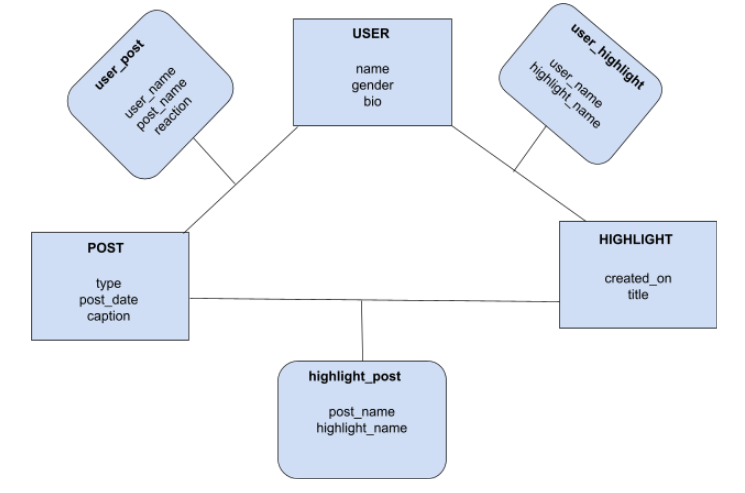
示例:假设用户 Ajay 上传了一张庆祝排灯节的照片作为帖子。Divya、Rahul 等许多用户对他的帖子点了赞。
现在用户 Ajay 想要找出他的帖子获得的「点赞」反应数量。
在进行搜索时,他将聚焦于 'user_post' 关系类型,并按照属性进行过滤:反应中包含 'like',且帖子名称中包含 'Diwali'。
过滤示例(针对 user_post 属性)
   {
     "relationshipName":       "user_post",
     "excludeDeletedEntities": true,
     "offset":                 0,
     "limit":                  25,
     "relationshipFilters": {
        "condition": "AND",
        "criterion": [
           {
              "attributeName":  "reaction",
              "operator":       "eq",
              "attributeValue": "like"
           },
           {
              "attributeName":  "post_name",
              "operator":       "contains",
              "attributeValue": "Diwali"
           }
        ]
     }
   }
支持的过滤运算符
与基础搜索相同的运算符。
CURL 示例
curl -sivk -g
    -u <user>:<password>
    -X POST
    -d '{
     "relationshipName":       "user_post",
     "excludeDeletedEntities": true,
     "offset":                 0,
     "limit":                  25,
     "relationshipFilters": {
        "condition": "AND",
        "criterion": [
           {
              "attributeName":  "reaction",
              "operator":       "eq",
              "attributeValue": "like"
           },
           {
              "attributeName":  "post_name",
              "operator":       "contains",
              "attributeValue": "Diwali"
           }
        ]
     }
   }'
    <protocol>://<atlas_host>:<atlas_port>/api/atlas/v2/search/relations
评论
登录后参与评论
正在加载评论…